 Aria
Aria
Say the edit.
Watch it happen.
Captions, vertical cuts, the moment she says the thing. Ask for it, then keep editing by hand.

Bring your own assistant


Ask in plain words. Keep the timeline.
Aria does the tedious half. What comes back is not a locked export, it is ordinary clips on ordinary tracks that you can drag, restyle, trim or throw away.
Caption this with karaokeWord-timed caption clips on their own track, styled from a preset, editable afterwards like anything else.
Make it vertical and keep her in frameFaces get tracked, the crop follows them with keyframes, and a 16:9 interview becomes a 9:16 short.
Find where she says "the best part" and cut thereTranscript search with word-accurate timings, so the cut lands on the syllable rather than near it.
Break this into scenesShot boundaries detected once and cached, so an hour of footage stops being a wall of thumbnails.
Pull the music off the vocalsSeparated stems land as their own audio clips, ready to duck, mute or replace.
Subtitle this in SpanishA local model translates the transcript sentence by sentence, and the captions keep their timing, preset and karaoke.

Inspector
shapeCaptions that time themselves.
Aria listens to your audio on your own machine, word by word, then builds the caption clips and animates the highlight in one step.
One take, thirty languages.
Transcribe, pick a language, translate. A model on your own machine reads whole sentences rather than words, keeps the names and jargon you tell it to, and delivers the same caption clips, presets and karaoke as any transcript. Nothing is uploaded, and it keeps working with no connection.
She says: “The best part is the last ten seconds.”
Lo mejor son los últimos diez segundos.
Le meilleur moment, ce sont les dix dernières secondes.
一番いいのは最後の10秒。
أفضل جزء هو الثواني العشر الأخيرة.
And a real editor underneath.
None of it matters if the editor is a toy. Aria grades, keys, masks, keyframes, mixes and exports, and the preview shows you what the export will do.
Keyframes with curves you can feel
Animate anything with a number on it. Pick an easing per segment or bend the curve by hand, and the preview follows as you drag.

Every ratio, one project
Cut once, then reframe for wherever it is going. Crop on the canvas by hand, or let a tracked face carry the crop for you.
Masks and transitions on the clip
Ellipse and polygon masks, invertible and animatable. Transitions belong to a clip edge, so nothing can drift out of sync with the cut.

Frame it on the picture
Drag and resize a clip on the preview itself, or type exact numbers. What you see is what renders, at full quality, every time.

Titles that arrive finished
Fifteen looks and nine motions, each drawn as the frame it makes. Drag one to the timeline, then change any of it, because it is a text clip like any other.
Backgrounds without a stock library
Gradients, checks, stripes, dots and grids, drawn at whatever size you deliver at. A ramp to transparent is the scrim that makes a title readable over a bright shot.
Scopes while you grade
Waveform, RGB parade, vectorscope and histogram under the picture, live as you drag a slider. So a grade that looks right is also right.
Exports that keep up with you
A graded 54-second project took three and a half minutes and now takes nine seconds. Aria decodes, composites and encodes on the graphics card, as MP4 or QuickTime .mov.
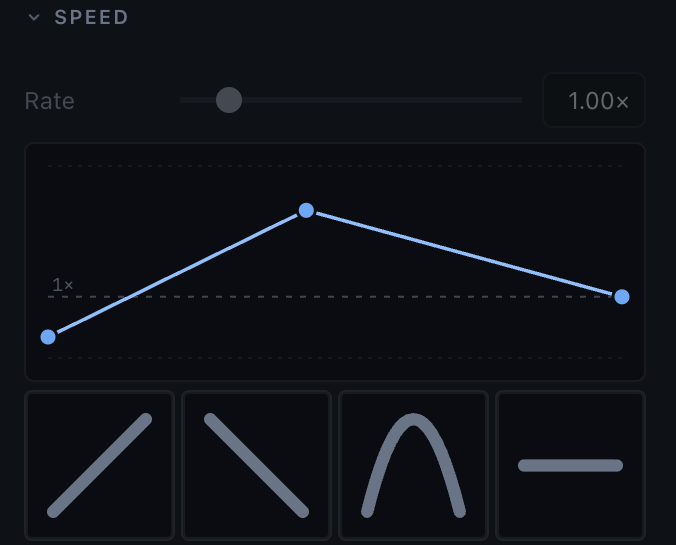
Speed as a curve, not a number
One rate for the whole clip, or points you drag: slow in, fast through the middle, normal again by the cut. Audio keeps its pitch and the clip's length follows.
Seventy-nine effects, and none of them lie to you
Grades, keys, LUTs, blurs and distortions, plus EQ, compression and reverb for sound. Every parameter has a declared range, so a bad value is caught while you are editing rather than found in the export.
-
 Brightness
-
 Contrast
-
 Curvesdefaults do nothing
-
 Exposure
-
 Gamma
Gamma
-
 Highlights & Shadows
Use the AI you already pay for.
Aria writes the connection for you. Point Claude Code, the Claude app or Codex at the window you have open, and it edits alongside you.
One dialog, then it is set up
Tick the assistant you use and press Install. Nothing is written to your machine until you do, and one uninstall takes it back out.
You watch it work
Clips appear on your timeline as they are made, in the window you already have open. No round trip, no waiting on a render to see what you got.
Command Z is the review
Its edits share your undo history, so taking one back is the same keystroke as taking back your own. The History panel names who made every change, and walks you back to any of them.
It checks its own work
It can render a frame off your timeline and look at it, so a caption that fell off screen gets fixed before you ever see it.
It follows your house style
Write down how your videos look once, in your own words, and it reads that before it makes a design choice. Keep your colours, your fonts and your logo in a kit, and point a project at the kits it should follow.

If you like to tinker, it goes deeper.
Everything the app can do is a scripted API. Feed it a spreadsheet of clips, batch a hundred shorts, or build the edit you always make out of a loop.
import aria project = aria.connect()video = project.timeline.track("V1")captions = project.timeline.add_track("text", name="Captions") with project.transaction("Assemble the cut"): for shot in aria.read_json("shots.json"): clip = video.append(shot["file"], duration=shot["seconds"]) clip.fade_in(0.3) captions.add_clip(text=shot["caption"], start=clip.start)One price. It is zero.
Aria is free. All of it, for everyone. But a serious product page has a pricing table, and we intend to look serious.
Free
- The whole editor, every effect, every export
- No watermark, no queue, no upsell
- Support from the people who wrote it
Free Plus
- Everything in Free
- The quiet confidence of having upgraded
- Priority access to the same updates as everyone
Free Pro
- Everything in Free Plus
- The word Pro, for your invoices
- Unlimited undo, which you already had
Free Enterprise
- Everything in Free Pro
- Unlimited seats, invoiced at nothing
- A dedicated account manager: the Undo button
All four plans install the same build. Pick the one that matches your self-image.
Open it and cut something.
Free, no watermark, no export queue. Your footage stays on your machine, and so does the transcription.
By downloading you agree to the Terms of Service and the Privacy Policy.
- No watermark Export at full quality on the free version, because there is only one.
- No subscription Nothing to renew and nothing to cancel. The price does not change later.
- No queue Renders run on your own machine, so nothing waits behind anyone else.